Creating, Saving and Loading Jobs (Toolbar)
Jobs contain sensor, tool, and control configurations for a particular inspection or quality control application. (For more information, see Configuring GoPxL.)
A sensor can store many jobs, subject to sensor storage limitations. Running GoPxL on a PC or using GoMax NX provides more storage. Being able to switch between jobs is useful when a sensor is used with different constraints during separate production runs. For example, width decision minimum and maximum values might allow greater variation during one production run of a part, but might allow less variation during another production run, depending on the desired grade of the part.
Most of the settings that you can change in GoPxL's web interface are temporary until saved in a job file. If there is a job file that is set as the default, it will be loaded automatically when GoPxL starts.
GoPxL lets you perform several job-related operations from the global toolbar at the top of the interface:
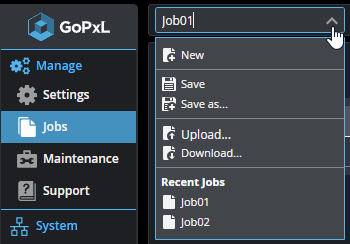
Other operations are available on the Manage > Jobs page. For more information on jobs and working with them, see Jobs.