Filters
The filters in the Filters panel are used to process scan data along the X or Y axis to remove noise or clean it up before it is used by measurement tools or is output. Using the filters can help you get more repeatable measurements. The filters are only available when uniform spacing is enabled.
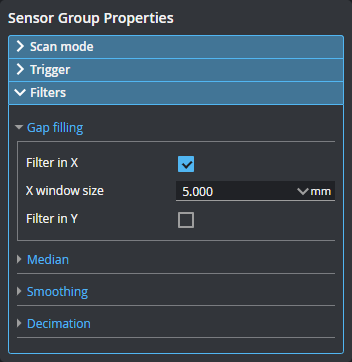
The following filters are available in the Filter panel.
Filters
|
Gap Filling
|
Fills in missing data using information from the nearest neighbor data points, for example, when data is missing due to occlusions. Gap filling also fills gaps where no data is detected, which can be due to low surface reflectivity, for example dark or specular surface areas, or to actual gaps in the surface. The values in Filter in X and Filter in Y represent the maximum gaps the sensor will fill. Wider gaps are not filled.
Gap filling works by filling in missing data points using either the lowest values from the nearest neighbors or linear interpolation between neighboring values (depending on the Z difference between neighboring values), in the specified window. The sensor can fill gaps along both the X axis and the Y axis.
In Profile mode, gap filling is limited to the X axis.
|
|
Median
|
Substitutes the value of a data point with the median calculated within the window or windows set in X Window Size or Y Window Size around the data point. If the number of valid (non-null) data points in the window is even, the median value is simply the value in the center of the sorted list of values. If the number of valid points is odd, the average of the two values in the center is used instead.
Missing data points will not be filled with the median value calculated from data points in the neighborhood.
With an odd window size, the output is at the center of the window. With an even window size, the output is 0.5 pixels to the right of the center (that is, using window / 2-1 values from the left, and window / 2 from the right.
|
|
Smoothing
|
Substitutes a data point value with the mean value of that data point and its nearest neighbors within the window or windows set in X Window Size or Y Window Size. X smoothing works by calculating a moving average across samples along the X axis. Y smoothing works by calculating a moving average along the X axis.
If both X and Y smoothing are enabled, the data is smoothed along X axis first, then along the Y axis.
Missing data points will not be filled with the mean value calculated from data points in the neighborhood.
|
|
Decimation
|
Decimation reduces the number of data points along the X or Y axis by choosing data points at the end of a specified window around the data point. For example, by setting X Window Size to 0.2, only points every 0.2 millimeters will be used. The filter generates points starting from the leftmost edge of the scan data, stepping in equal steps away from that side.
|
Tool-based filtering is also available on the Tools page. The filters described here and in the filter tool topics use the same algorithms.
Using tool-based filtering provides various advantages:
- Additional filters not available in the Filters panel. (This mostly applies to Surface filters.)
- Choosing which tools used in a job take filtered data as input. That is, you can decide to have some tools running on unfiltered data and other tools on filtered data.
For more information on tool-based filters, see Surface Filter (Surface-based) and Profile Filter (Profile-based).
The filter window sizes are specified in millimeters (and additionally, in the tools, in data points). To calculate the number of data points that a window covers when the units are millimeters, use the following calculation:
- User-specified window size divided by the X spacing interval (that is, the number of millimeters per point) on the Spacing tab in the Sensor panel. (For more information on spacing intervals, see Uniform Spacing.)
- With the exception of the gap filling filter, round the result of the division to the nearest integer value. With the gap filling filter, filling is performed within the provided window size.
For example, if you set the size of the filter's window to a value between 1.5 mm and 2.49 mm (inclusively), and the X spacing interval is set to 1 mm, the filter covers 2 data points. A filter window size from 2.5 mm to 3.49 mm results in a filter covering 3 data points.