User Data Input Tool
The User Data Input tool lets you send data to GoPxL from PLCs over EtherNet/IP, PROFINET, or via the SDK. After you configure the tool to indicate the data types and their offsets, the tool makes the data available in its outputs. A typical use case for this is to use the tool's string output as part of file names output with the data storage service, for example, part ID information. For information on the data storage service, see Data Storage Service.
For information on EtherNet/IP, see EtherNet/IP Protocol.
For information on PROFINET, see PROFINET Protocol.
For information on adding, managing, and removing tools, as well as detailed descriptions of settings common to most tools, see Tool Configuration.
Inputs
You configure the tool's inputs in the expandable Inputs section.
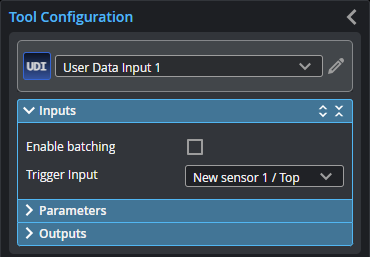
| Name | Description |
|---|---|
| Enable Batching |
When Enable Batching is checked, the tool takes an array as input and processes each element in the array individually. There is no limit to the size of the array, other than the processing limitations of the sensor. For more information on arrays, batching, and aggregating, see Arrays, Batching, and Aggregation. |
|
Trigger Input |
The input the tool takes. |
Parameters
You configure the tool's parameters in the expandable Parameters section.
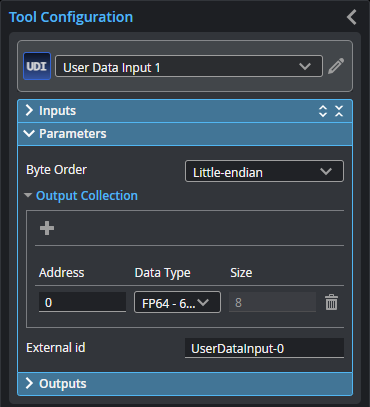
| Name | Description |
|---|---|
| Byte Order |
The "endianness" of the data being injected into the tool chain. For PLCs, consult the PLC manufacturer's documentation. |
| Output Collection |
An expandable section containing a list of the data GoPxL is receiving. For each piece of data the tool is receiving, set the address and data type. |
|
External ID |
The external ID of the tool that appears in GoHMI Designer. For more information, see GoHMI and GoHMI Designer. |
Outputs
This tool provides no outputs other than saving exported data in C:\GoTools\DataExport.
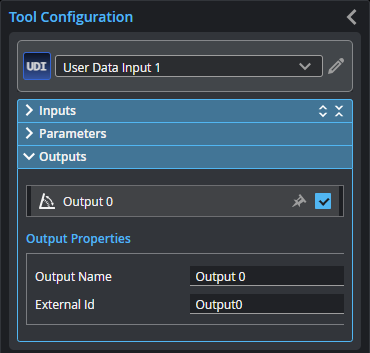
To set whether measurement values are considered a Pass or Fail, select a measurement in the outputs list, and then enable and configure its Min and Max parameters in the Output Properties section; you can enable one or the other, or both.
By default, Min and Max are both disabled, and a measurement is considered a Pass.
| Type | Description |
|---|---|
|
Output {n} |
The outputs available to other tools. |